Suika game on your phone
Squish Merge runs in a phone browser. Press Play and the game takes the whole screen.
About 22 MB, nothing to install · open it on its own page
- Download
- About 22 MB, starts when you press Play
- Install
- None
- Controls
- Press and hold, pull down to aim, release to launch
- Run ends
- Both side paddles pushed all the way down, each for 0.5 seconds
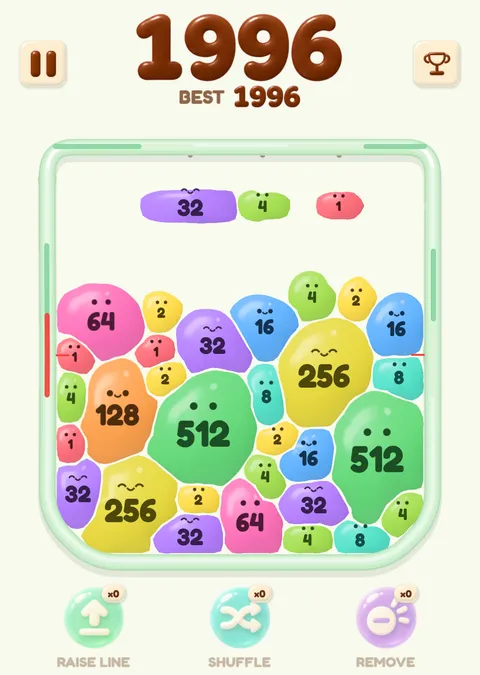
About 22 MB, nothing to install
The game could not start. Check your connection and reload the page.
Starting on a phone
On a phone, Play opens the game full screen. Tap Close to come back to the page; press Play again and you are back in the same run.
There is nothing to install. The game starts when you press Play.
Playing with a thumb
The controls are the same as on a computer, with a finger instead of a mouse. Press a blob in the row above the jar and hold, pull down to aim, and lift to launch. To cancel, drag the blob back toward the row before you lift.
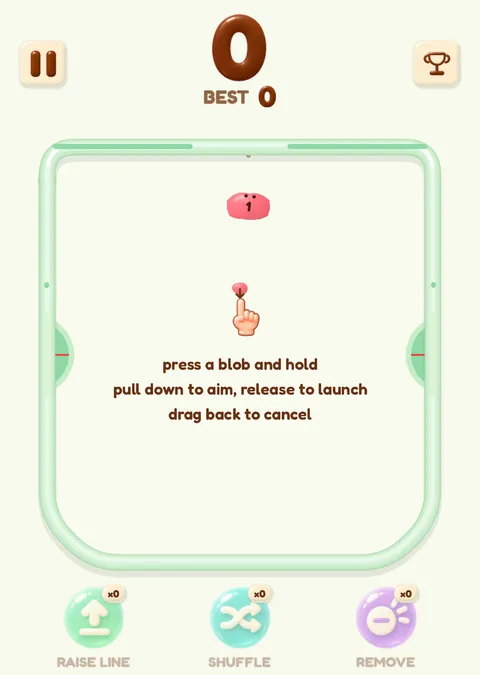
What ends a run
A green half-circle paddle sits on each side of the jar. The run ends when the pile pushes both all the way down and each stays down for 0.5 seconds.
A run ends here
Both paddles pushed all the way down, each held for 0.5 seconds. One paddle alone changes nothing.
Moves that keep the pile away from the paddles: suika game strategy. Playing on Switch too: Nintendo Switch Suika Game. Back to the suika game home page.
Questions
Do I need an app?
No. The game runs in the browser.
Is it free on a phone?
Yes. There is no sign-up and no ads during a run.